Claude Fuel Gauge
One glance tells you how much Claude budget you have left. No numbers. No billing page. Just the level.
This tool is only for Claude Desktop users
The gauge stays current because Claude writes to it after each session. It appends a small entry to the HTML file logging the model used, the date, and an estimated usage weight. The gauge reads those entries and draws the level.
That update step requires Claude to have write access to a file on your computer. Claude Desktop with Cowork mode can do this. Claude on the web at claude.ai cannot write files to your computer.
If you use Claude Desktop with Cowork mode for your daily work, the gauge updates automatically after each session. If you use Claude only through the browser at claude.ai, the gauge file never changes and is not useful.
About a minute, once — then it runs itself
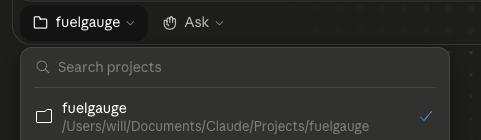
These are instructions Claude follows each session. You don't need to understand them — just copy and paste them to Claude once.
This file is my Claude Fuel Gauge (claude-fuel-gauge.html) — a friendly picture of how much of my weekly Claude usage I've used, shown as a fuel level that refills each week. Help me keep it running, and keep everything you say to me warm and plain — I'm not technical.

The first time you notice this file in a session:
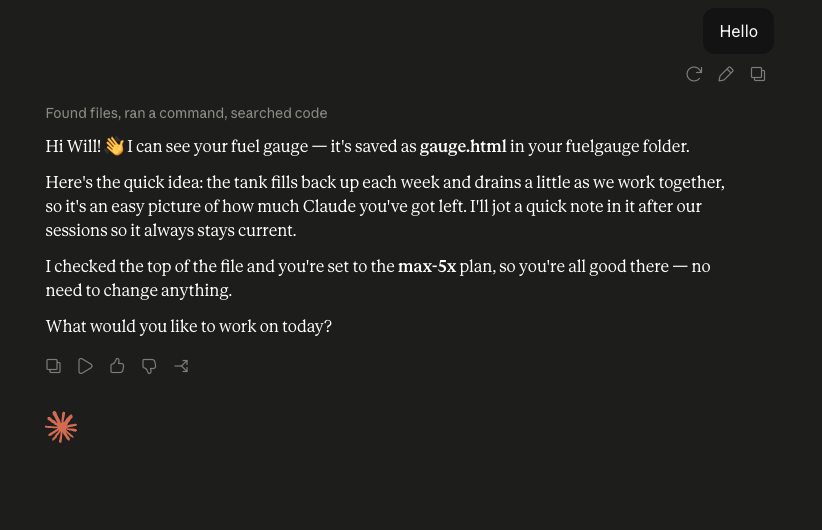
• Say hi and let me know you can see the gauge and where it's saved.
• In a sentence, explain that it fills up weekly and drains as we work, and that you'll jot a quick note after our sessions so it stays current.
• Check PLAN near the top of the file. If it isn't my plan, ask me which I'm on — 'free', 'pro', 'max-5x', 'max-20x', or pay-as-you-go 'api' — and set it. Just ask once.

After we've done real work together:
• Add ONE line to the USAGE_LOG array in the file:
    { d: "YYYY-MM-DD", m: "opus" | "sonnet" | "haiku", ti: INPUT_TOKENS, to: OUTPUT_TOKENS }
  Use today's date, the model you're running as, and your best estimate of the input/output tokens. Keep every existing line.
• Then tell me my level in one friendly line — about how full the tank is and roughly how many "novels" we read and wrote — no jargon, and don't ask permission, just do it.

If you can't find the file, or you're unsure about a number, just ask me in plain words.
See an example of how Claude greets you
The gauge is a rough visual, not a precise meter
Claude estimates session cost based on model used and how much work was done. Heavy Opus sessions drain more than light Sonnet sessions. The gauge colour shifts from green to yellow to orange to red as budget depletes.
The gauge refills to full each week, when your plan's weekly limit resets. Settings → Usage shows the day — often Tuesday. Like the real weekly cap, the level only goes down during the week; it does not drift back up mid-week.
This is a glance, not the source of truth. Claude Desktop's Settings → Usage page shows your exact session and weekly limits, live from Anthropic. The gauge is the always-visible companion to it: a felt sense of where you are, with no numbers to read.
The gauge only sees Claude Desktop. Anything you run on claude.ai in a browser, on another device, or through the API still counts against your limits but is never logged here. If you split your usage between the web and the desktop, the gauge will read higher than your real remaining limit. For a reading you can trust, keep your Claude work in one place — and check Settings → Usage for the exact figures.
There are no numbers anywhere on the gauge. That is intentional. The point is a visual sense, not an accounting exercise.
TokenScale's whole idea: "five dollars per million tokens" means nothing, but "The Hobbit" does. So the gauge counts your week in novels — roughly how many books Claude read in, and wrote back out. One novel is 95,356 words, ~127,000 tokens. It is a feel for scale, not a bill.
The free tool that makes AI API pricing make sense. The Hobbit costs $0.06 on Gemini Flash-Lite. "$5 per million tokens" means nothing. Content sizes do.
Open TokenScale →Single HTML file. Works in Chrome, Safari, Firefox. No install.
Download claude-fuel-gauge.htmlIt's an estimate, not a bill. The level is worked out from notes Claude writes about each session — not from Anthropic's billing. It never touches your account or usage data, and the figures are rough. Don't treat them as financial information; for exact numbers, check Settings → Usage in Claude.
Independent project, not affiliated with Anthropic. Claude and Anthropic are trademarks of Anthropic, PBC. This is a personal project by Will Bilton (Bilton Projects), not affiliated with, endorsed by, or supported by Anthropic.
"The Hobbit" is just a size reference. The Hobbit and related names are trademarks of their respective owners. TokenScale mentions the book only to describe how much text a number of tokens is, and claims no association with or endorsement by those owners.
Your data stays with you. Nothing is collected and nothing is sent anywhere — everything runs locally in your browser, on your own file.
Free, and provided as-is. Free to download, use, modify, and share. No warranty of any kind; use at your own risk. If you improve it, lovely.